
How to Check How Many SIM Cards Are Registered in Your Name (and Block the Rest)
Quick answer: Go to sancharsaathi.gov.in (or the Sanchar Saathi app), choose “Know mobile connections in your name”, enter your mobile number and the OTP, and you’ll see every connection registered against your identity. Mark any number you don’t recognise as “Not my number” and submit. One person can hold a maximum of 9 SIMs in India (6 in Jammu & Kashmir, Assam and the North-East).
Most of us know exactly how many SIM cards we use: one, maybe two. What we don’t always know is how many have been issued in our name. An old dealer who photocopied your Aadhaar twice, a SIM you bought for a parent years ago, a connection from a job you left: they can all still be sitting against your identity.
That matters more now than it used to. Since 1 November 2026, India’s new caller name display (CNAP) shows the registered name on calls from unsaved numbers. If a SIM in your name is in someone else’s hands, every call they make shows your name, and if it’s used for fraud, the trail leads back to you. The good news is that checking takes about two minutes, and it’s free.
How to Check SIM Cards Registered in Your Name
The Department of Telecommunications (DoT) runs this check through its Sanchar Saathi portal. You can use the website or the official Sanchar Saathi app on Android and iPhone.
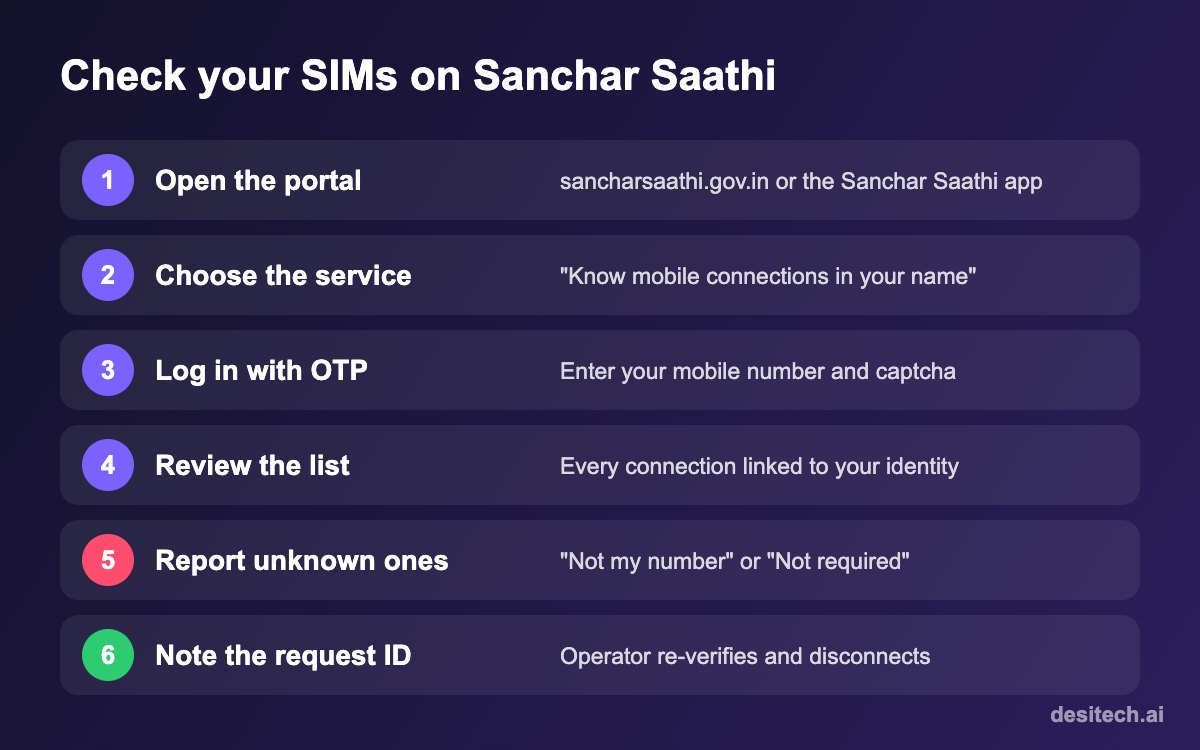
- Open sancharsaathi.gov.in or the Sanchar Saathi app. Make sure it’s the official government site, ending in .gov.in.
- Under Citizen Centric Services, select “Know mobile connections in your name” (this service used to be called TAFCOP).
- Enter your 10-digit mobile number and the captcha, then enter the OTP sent to that number.
- Review the list. You’ll see the mobile connections linked to your identity across Jio, Airtel, Vi and BSNL. Numbers are partly masked for privacy.
- Report anything that isn’t yours. Tick the right option next to each unknown connection and click Report.
- Save the request or ticket ID shown after submitting, so you can track the status later on the same page.
“Not my number” or “Not required”: which one to choose?
- Not my number: you never took this connection. Choose this for any SIM issued without your knowledge. It’s the one that matters for fraud.
- Not required: the connection is yours, but you no longer use it or want it, such as an old work SIM or a number you bought for someone else.
Reported connections are flagged to the operator for re-verification. If the person using the number can’t re-verify it with valid documents, the operator disconnects it.
How Many SIM Cards Can One Person Have in India?
Under the rules that came with the Telecommunications Act, 2023, one person can hold a maximum of 9 mobile connections across all operators. In Jammu & Kashmir, Assam and the North-Eastern licensed service areas, the limit is 6.
Going over the limit can attract a fine of up to ₹50,000 for a first offence and up to ₹2 lakh for repeat violations. The law is far stricter on fraud: getting a SIM by using someone else’s identity documents can mean up to three years in prison, a fine of up to ₹50 lakh, or both. That’s another reason to clean up your list. If you’re over the limit only because of old connections you forgot about, mark them “Not required” or surrender them with your operator.
| Situation | What to do |
|---|---|
| A number you never bought | Report as “Not my number” and consider a police complaint if you suspect misuse |
| An old SIM you no longer use | Report as “Not required” or ask your operator to disconnect it |
| A SIM used by a family member but in your name | Keep it only if you’re comfortable; your name shows on their calls, and you’re responsible for the connection |
| More than 9 connections (6 in J&K, Assam, North-East) | Disconnect or transfer the extra connections to avoid penalties |
Why Unknown SIMs End Up in Your Name
Most people who find an unfamiliar number never handed their documents to a criminal. Common causes include:
- Retailers misusing your KYC. In the past, some agents activated extra SIMs during a single purchase and sold them on.
- Photocopies of Aadhaar or other ID shared with hotels, shops, offices or courier services.
- Connections you’ve forgotten, like a dongle SIM, a number bought for a parent, or a corporate SIM issued on your ID.
- Old numbers that were never formally surrendered.
Whatever the reason, the fix is the same: report it and let the operator re-verify the connection.
After You Find an Unknown Number
- Report it on Sanchar Saathi as “Not my number”, as above.
- Tell your own operator through customer care or a store, and ask them to note the dispute on your profile.
- If you suspect it’s been used for fraud, for example if you’ve had calls from police or banks about a number you don’t own, file a complaint at cybercrime.gov.in or call 1930, and keep a copy of your Sanchar Saathi report.
- Be careful where you share ID copies. Write the purpose and date across any photocopy you hand over, for example “For SIM verification only, 13/11/2026”. It makes reuse harder.
- Check again in a month to confirm the number has disappeared from your list.
Watch out for fake “SIM check” websites
Because this check is popular, lookalike sites have appeared that ask for your Aadhaar number or OTP. The official service only asks for your mobile number, a captcha and an OTP sent to that number, and it lives on sancharsaathi.gov.in. Never enter your Aadhaar number or bank details into a site offering a “SIM check”.
SIM Check FAQ
Is the Sanchar Saathi SIM check free?
Yes. It’s a free service from the Department of Telecommunications. Anyone asking you to pay for a “SIM check” is not the official service.
Do I need my Aadhaar number to check?
No. You log in with your mobile number and an OTP. The portal finds connections linked to the identity used for that number.
How long does it take to disconnect a number I reported?
The operator first re-verifies the connection, so it isn’t instant. Check the status with your request ID after a couple of weeks, and follow up with the operator if it’s still active.
Will reporting “Not required” cut off a SIM my family uses?
Yes, it can. Only mark a connection “Not required” if you’re sure nobody needs it. If a family member uses a SIM in your name, consider transferring it to their own name with the operator instead.
Why does my list show fewer numbers than I expected?
The list shows connections linked to the identity details used for the number you logged in with. A SIM bought with a different ID document may not appear. If you’ve used more than one ID over the years, check with a number registered on each.
The Bottom Line
A SIM in your name is a small thing until someone else misuses it, and with caller names now showing on calls, it carries your identity every time it rings. Spend two minutes on Sanchar Saathi today, report anything you don’t recognise, and get your parents to do the same. They’re often the ones with forgotten connections from years ago.
Sources
- Department of Telecommunications, Sanchar Saathi portal: “Know mobile connections in your name” service and FAQs.
- Telecommunications Act, 2023 provisions on SIM limits and penalties (in force from 26 June 2024), as reported by India TV, DNA and Onmanorama.
- Department of Telecommunications directive on Calling Name Presentation (CNAP) from 1 November 2026.
