
GTA 6 Download Slow? How to Download Faster on PS5 and Xbox
Quick answer: At around 210 GB, GTA 6 takes about 4–5 hours on a steady 100 Mbps connection and much longer on slower plans or busy launch-day servers. To speed it up: connect the console with a LAN cable (or use 5 GHz Wi-Fi close to the router), pause other downloads at home, let it download in Rest Mode overnight, and restart your router. Don’t keep pausing and resuming. Start the preload as early as you can.
Your console can only download as fast as your internet, Wi-Fi and the store’s servers allow. Launch week for GTA 6 will push PlayStation and Xbox servers hard, so the best strategy is to download early and remove every bottleneck on your side.
How Long Will GTA 6 Take to Download?
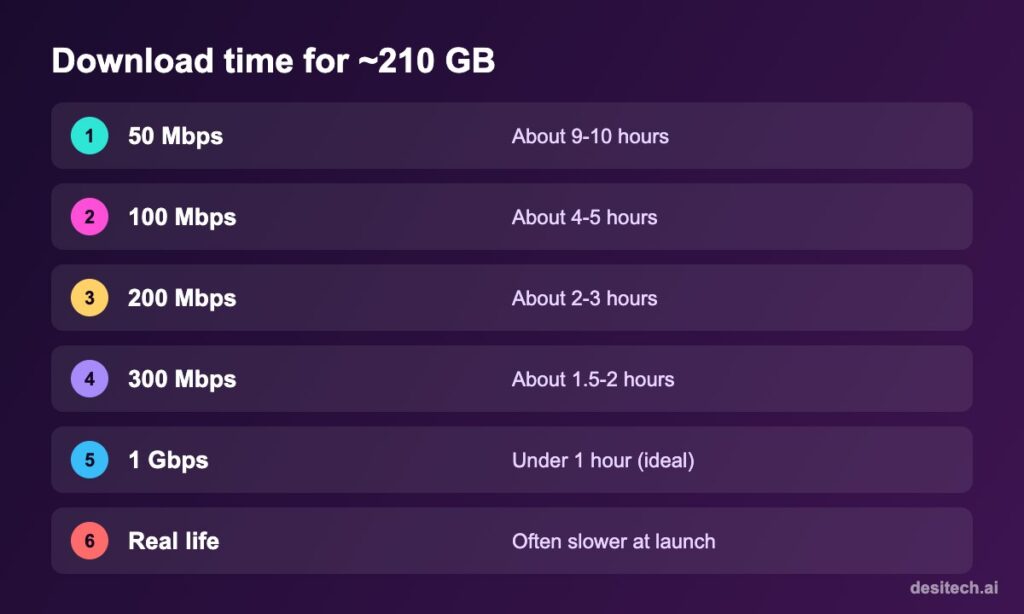
A rough formula: size in GB × 8 ÷ speed in Mbps ÷ 3,600 = hours. For 210 GB at 100 Mbps: 210 × 8 ÷ 100 ÷ 3,600 ≈ 4.7 hours. Real downloads are often slower because of Wi-Fi losses and server load.
Step 1: Test Your Console’s Real Speed

- PS5: Settings → Network → Connection Status → Test Internet Connection.
- Xbox: Settings → General → Network settings → Test network speed & statistics.
Compare with your plan. If the console gets a fraction of your plan speed, the problem is your home network, which you can fix.
Step 2: Fix the Connection
Use a LAN cable
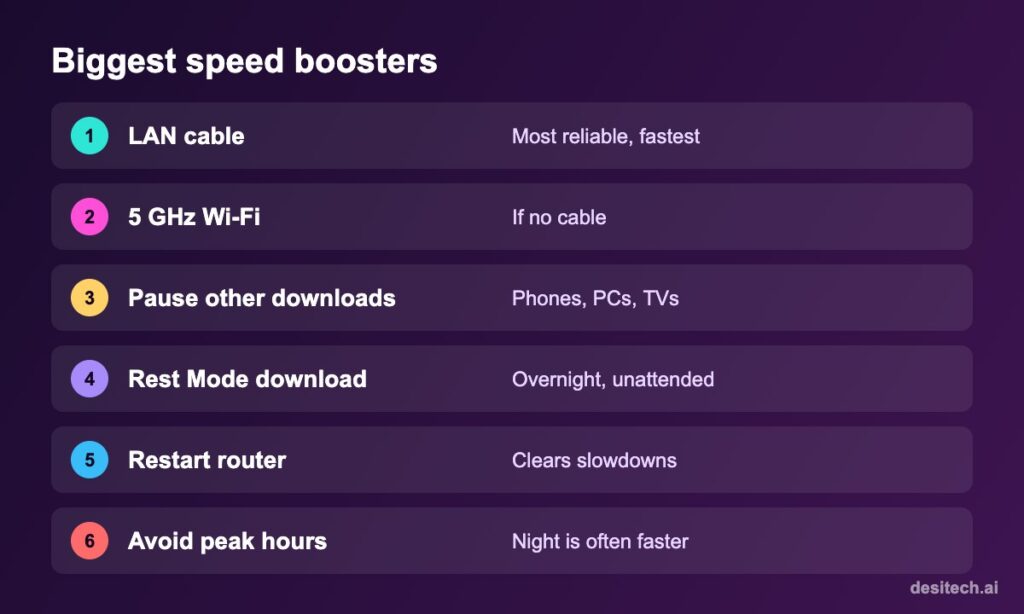
A wired Ethernet connection is the single biggest improvement for most homes. A long Cat 6 cable is cheap compared with hours of waiting.
Or use 5 GHz Wi-Fi
If a cable isn’t possible, connect to your router’s 5 GHz network and keep the console in the same room or with few walls in between.
Free up bandwidth
Pause downloads, backups and 4K streaming on other devices while the game downloads, especially phone photo backups and Windows updates.
Restart the router
Unplug it for 30 seconds. Many home routers slow down after days of uptime.
Step 3: Console Download Settings
PS5
- Settings → System → Power Saving → Features Available in Rest Mode → turn on Stay Connected to the Internet.
- Put the PS5 in Rest Mode instead of turning it off.
- Don’t play online games or stream while downloading.
Xbox Series X|S
- Settings → General → Power options: keep updates and downloads enabled while the console is off/in standby (wording varies by update).
- Closing games speeds up downloads: Xbox throttles background downloads while a game is running.
Step 4: Try These If It’s Still Slow
- Pause and resume once, not repeatedly. Sometimes it reconnects to a faster server.
- Change DNS to a public DNS (e.g. 8.8.8.8 / 8.8.4.4 or 1.1.1.1 / 1.0.0.1) in the console’s advanced network settings. It doesn’t increase raw speed but can help reach better servers.
- Download at night when your ISP and the store servers are less busy.
- Check the store’s status page (PlayStation Network status / Xbox status). If they report problems, the only fix is waiting.
- Contact your ISP if wired speed is far below your plan.
| Problem | Fix |
|---|---|
| Download stuck at a percentage | Pause, wait 1 minute, resume; restart console |
| Very slow on Wi-Fi | LAN cable or 5 GHz, move closer |
| Slow only on launch day | Server load; let it run overnight |
| “Not enough space” | Free 250 GB+ (see our storage guide) |
| Download stops overnight | Enable Rest Mode internet (PS5) / standby downloads (Xbox) |
FAQ
How long does GTA 6 take to download?
About 4–5 hours at a steady 100 Mbps for ~210 GB. Slower plans or busy servers can take much longer.
Does Rest Mode download faster on PS5?
It doesn’t make the internet faster, but downloads continue without games competing for bandwidth, so it’s often quicker overall.
Will a VPN make GTA 6 download faster?
Usually not. It often slows downloads.
Can I play while GTA 6 is downloading?
You can play other games, but online games and streaming will slow the download.
The Bottom Line
Start early, plug in a LAN cable, free up bandwidth, and let the console download in Rest Mode overnight. On launch day, patience beats endless pausing.
Sources
- PlayStation Support: Test your internet connection; Rest Mode features.
- Xbox Support: Troubleshoot slow game downloads; network speed test.
- Rockstar Games: GTA VI release and preload dates; reported ~210 GB PS5 download size.
