
Lost or Stolen Phone in India? How to Block It With CEIR (and Get It Back)
Quick answer: File a police complaint, get a duplicate SIM for your number, then go to sancharsaathi.gov.in and choose “Block your lost/stolen mobile handset”. Enter the phone’s IMEI, upload the police complaint and your ID, and confirm with an OTP. The phone’s IMEI is then blocked on every network in India, and you can unblock it from the same portal if you get it back.
Losing a phone in India used to mean two things: the handset was gone, and whoever had it could keep using it with a new SIM. That’s no longer true. Through the government’s CEIR system, a lost or stolen phone can be blocked by its IMEI, so it stops working on every Indian network, and if it’s switched on with a new SIM, it can be traced.
It works more often than people expect. The Ministry of Communications said in October 2026 that more than 14 lakh lost and stolen handsets had been recovered through Sanchar Saathi. Here’s exactly what to do, in the right order.
First, Do These Things Within the Hour
Blocking the handset protects the phone. These steps protect your money and accounts, which matters more in the first hour.

- Try to locate and lock it. On Android, use Google’s Find My Device (now part of Find Hub) at google.com/android/find. On iPhone, use Find My at icloud.com/find. Mark it as lost, show a contact number on the lock screen, and erase it if you’re sure it’s stolen.
- Block your SIM. Call your operator’s customer care from another phone and ask them to block the SIM, so nobody can receive your OTPs.
- Freeze payments. Call your bank’s helpline to block UPI and cards linked to that number. If money has already been taken, call 1930 immediately.
- Change key passwords, starting with your email account, from another device, and sign the lost phone out of your Google or Apple account.
How to Block a Lost or Stolen Phone With CEIR
CEIR stands for Central Equipment Identity Register. It’s run by the Department of Telecommunications (DoT) and available through the Sanchar Saathi website and app.
Step 1: File a police complaint
Report the loss or theft at your nearest police station, or through your state police’s online lost-article or e-FIR service if it has one. Note the complaint number and keep a copy (a photo or PDF is fine). You’ll need to upload it.
Step 2: Get a duplicate SIM
Visit your operator’s store with ID and get your number reissued on a new SIM. One thing that catches people out: under TRAI rules, SMS is disabled for the first 24 hours on a reissued SIM, so you may not receive the CEIR OTP on it straight away. Either wait 24 hours or use another active number for the OTP.
Step 3: Find your IMEI number
The IMEI is a 15-digit number that identifies the handset. Dual-SIM phones have two. You’ll find it on the phone’s box, on the purchase bill, or, for many Android phones, in the device details on Google’s Find My Device website. It’s worth noting your IMEI today, while you still have your phone: dial *#06# and take a screenshot.
Step 4: Submit the block request
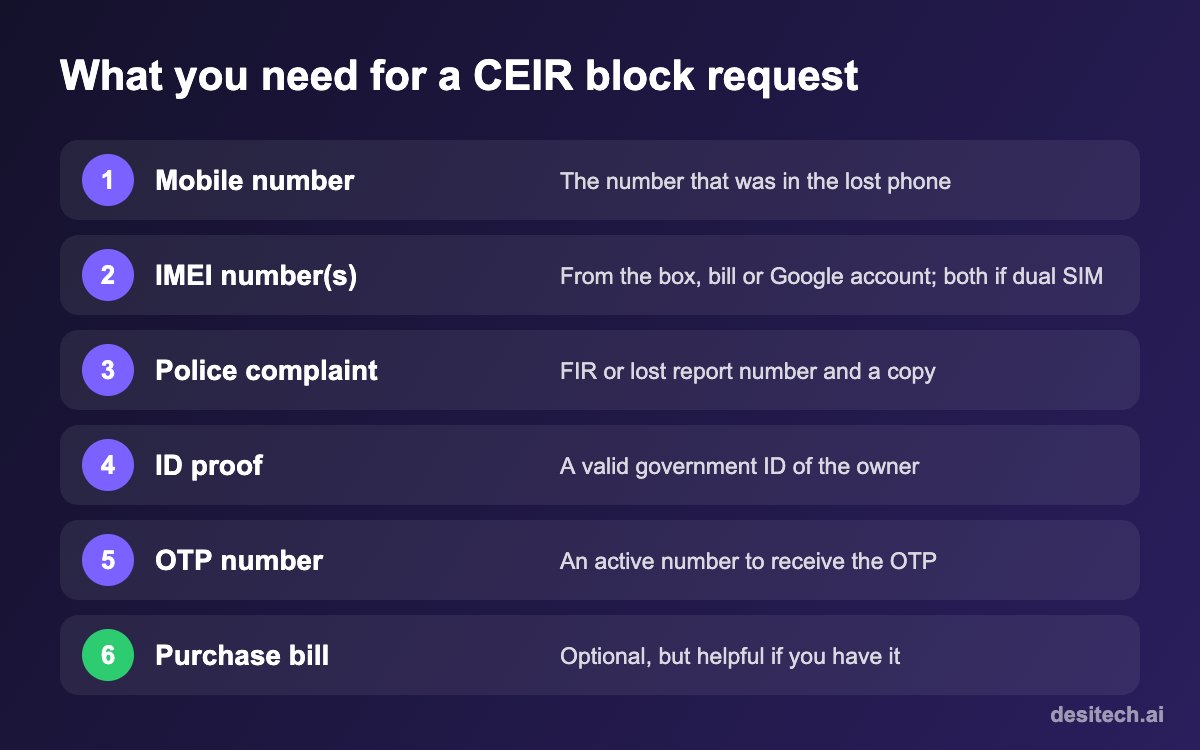
- Go to sancharsaathi.gov.in (or the Sanchar Saathi app) and select “Block your lost/stolen mobile handset”.
- Fill in the device details: mobile number(s), IMEI number(s), brand and model, and upload the purchase bill if you have it.
- Fill in the loss details: where and when it was lost, the police station, and the complaint number. Upload the complaint copy.
- Enter the owner’s details and upload a valid ID proof.
- Enter a mobile number for the OTP, verify it, accept the declaration and submit.
- Save the Request ID. You’ll need it to check the status or unblock the phone later.
Once processed, the IMEI is blacklisted across Indian networks. Blocking doesn’t stop tracing: if someone puts a SIM into the phone, the system can flag it to the police.
If You Get Your Phone Back
Only unblock once the phone is physically back with you.
- Inform the police that the phone has been found, as required before unblocking.
- On Sanchar Saathi, choose the option to unblock a found mobile, enter your Request ID and the mobile number used during blocking, and verify with the OTP.
- Once the request is processed, the phone works normally on all networks again.
Buying a Second-Hand Phone? Check It First
The same system can protect you from accidentally buying a stolen phone, which can be blocked or seized later. Before you pay:
- Dial *#06# on the phone and note the IMEI (both, if it’s dual-SIM). Check that they match the box and the bill.
- Send an SMS: KYM <15-digit IMEI> to 14422, or use the “Know Your Mobile” option on Sanchar Saathi.
- If the result says blacklisted, duplicate or already in use, don’t buy the phone.
- Get a written receipt with the seller’s name, phone number and the IMEI on it.
| KYM result | What it means | Should you buy? |
|---|---|---|
| Valid, with matching brand and model | The IMEI is registered and not reported | OK to proceed, after checking the phone itself |
| Blacklisted | Reported lost or stolen | No |
| Duplicate | The IMEI may be cloned or tampered with | No |
| Already in use | The same IMEI is active on another device | No |
Lost Phone FAQ
Is blocking a phone on CEIR free?
Yes. Blocking, tracking and unblocking through Sanchar Saathi is free. You only pay your operator’s usual charge, if any, for a duplicate SIM.
Can I block my phone without a police complaint?
No. A police complaint number and copy are required for the block request. Many states let you file a lost-phone report online, which is usually the quickest route.
Will blocking the IMEI erase my data?
No. CEIR blocks the phone on mobile networks, but it doesn’t touch the data. To erase the phone remotely, use Find My Device on Android or Find My on iPhone.
Can the police still track my phone after it’s blocked?
Yes. The official CEIR guidance says blocking doesn’t prevent police from tracking the phone. If someone inserts a SIM, it can be traced.
What if I don’t know my IMEI?
Check the phone’s box and bill first. On Android, Google’s Find My Device website often shows it in the device information. Going forward, dial *#06# on your phone and save a screenshot somewhere other than the phone itself.
The Bottom Line
A lost phone is stressful, but you’re not helpless. Lock it, block the SIM and freeze payments in the first hour, then file a police complaint and block the IMEI on Sanchar Saathi. And do one small thing today while your phone is still in your hand: dial *#06# and save your IMEI somewhere safe.
Sources
- Department of Telecommunications, Sanchar Saathi and CEIR portal: blocking, unblocking and Know Your Mobile (KYM) guidance.
- CEIR user manual and the TRAI rule on SMS for reissued SIMs (24-hour restriction).
- Ministry of Communications, Sanchar Saathi milestones (October 2026), as reported by News On AIR.
