
GTA 6 Storage: Will It Fit on Your PS5 or Xbox Series S? (How to Free Space)
Quick answer: GTA 6 is reported to be about a 210 GB download on PS5 (Rockstar hasn’t published a final install size for every console, and a day-one patch may add more). It fits on every PS5 and Xbox Series X, but takes about a third of a launch PS5’s ~667 GB usable space and more than half of an Xbox Series S‘s ~364 GB. Keep 250 GB or more free to be safe. Delete or move old games, and if you’re always short of space, add an M.2 SSD (PS5) or an official expansion card (Xbox).
GTA 6 launches on 19 November 2026 on PS5 and Xbox Series X|S, and digital preloading opened on 12 November. For many players the first boss fight isn’t in Vice City. It’s the “Not enough storage” message.
Here’s how much space you actually have, how to clear it in minutes, and when it’s worth buying more storage.
How Big Is GTA 6?
The figure most widely reported is about 210 GB on PS5, based on PlayStation Store data reported in late October. There’s no confirmed final Xbox size yet. Treat 210 GB as a minimum: launch-day patches and future updates usually add more.
For comparison, GTA V’s PS5 and Xbox Series versions are around 87–94 GB, so GTA 6 is more than double.
Will It Fit on Your Console?
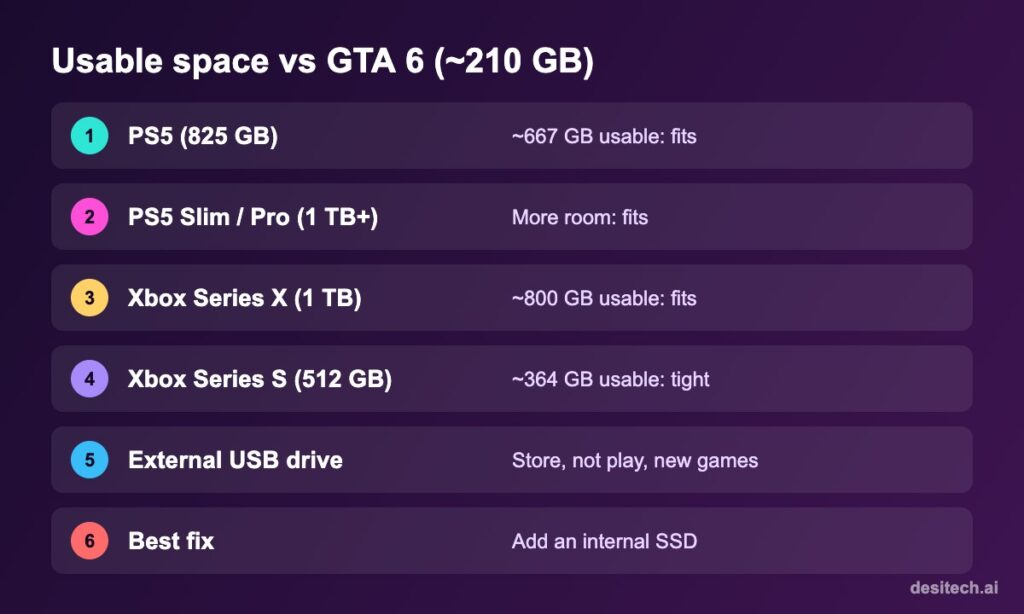
Advertised storage isn’t what you can use: the system software takes a chunk.
| Console | Approx. usable space | GTA 6 (~210 GB) |
|---|---|---|
| PS5 (original, 825 GB) | ~667 GB | Fits, about a third of the space |
| PS5 Slim / PS5 Pro (1 TB / 2 TB) | More than the original | Fits comfortably |
| Xbox Series X (1 TB) | ~800 GB | Fits comfortably |
| Xbox Series S (512 GB) | ~364 GB | Fits, but uses over half |
| Xbox Series S (1 TB) | Roughly double the 512 GB model | Fits |
To check your exact free space: on PS5, Settings → Storage → Console Storage. On Xbox, Settings → System → Storage devices.
Free Up Space on PS5

- Go to Settings → Storage → Console Storage → Games and Apps.
- Sort by size and delete games you’ve finished or rarely play. Your save data stays on the console (and in PS Plus cloud storage if you have it), so you can reinstall later.
- Check Media Gallery: long gameplay video clips take a lot of space.
- Remove unused game add-ons like extra language packs or modes you don’t play (for example, multiplayer packs in some games).
- Move PS4 games to an external USB drive: PS4 games can be played from USB storage.
Can I store GTA 6 on a USB drive?
You can store PS5 games on a USB extended storage drive to save re-downloading, but you can’t play PS5 games from it. To play, they must be on the internal SSD or an M.2 SSD installed inside the console.
Free Up Space on Xbox Series X|S
- Press the Xbox button → My games & apps → See all → Manage.
- Use Free up space or sort by size to uninstall games you don’t play. Cloud saves keep your progress.
- Delete old captures (Settings → Preferences → Capture & share).
- Move Xbox One and older games to an external USB drive. They can run from USB; Series X|S-optimised games need the internal SSD or an expansion card.
Should You Buy More Storage?
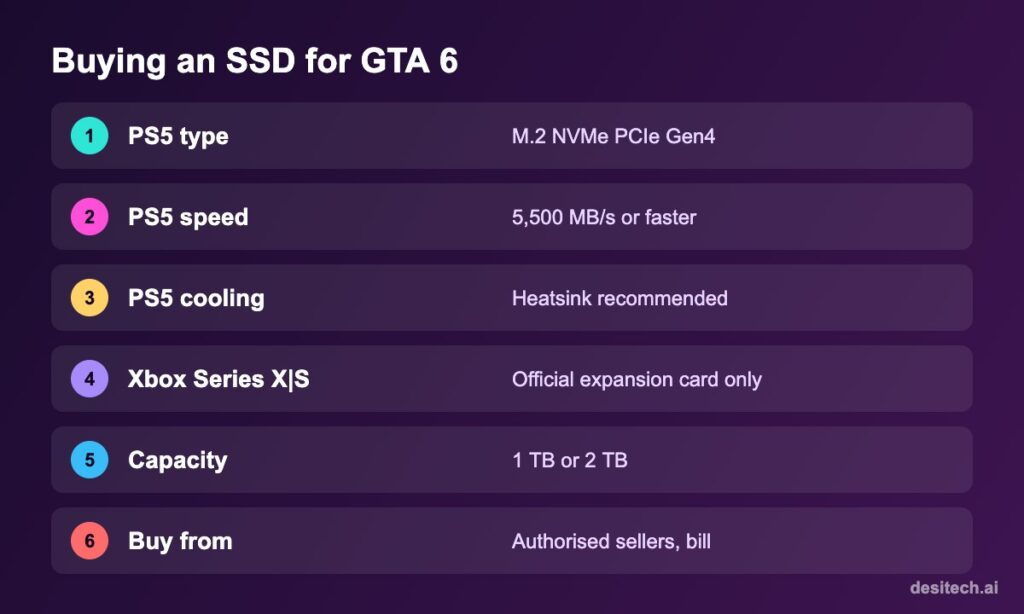
PS5: M.2 SSD
The PS5 has an expansion slot for an M.2 NVMe PCIe Gen4 SSD. Sony recommends drives with sequential read speeds of 5,500 MB/s or faster, and a heatsink or cooling structure. Installing one takes about 10–15 minutes with a small screwdriver; follow Sony’s official guide. A 1 TB or 2 TB drive is the sweet spot for a large library.
Xbox Series X|S: Expansion Card
Xbox uses dedicated Storage Expansion Cards (from Seagate, Western Digital and others) that plug into the back. Regular M.2 drives won’t work in that slot. The card behaves exactly like internal storage.
Buying tips
- Buy from authorised sellers and keep the bill for warranty.
- Avoid suspiciously cheap “2 TB” drives from unknown sellers; fake-capacity drives are common.
- Check your console model’s compatibility before ordering.
Preload Tips
- Preloading began on 12 November, a week before launch. Start early to spread the download over several days.
- Keep the console in Rest Mode (PS5) or with downloads enabled while off (Xbox) so it keeps downloading overnight.
- Physical copies of GTA 6 are reported to be a download code in the box, not a disc, so even physical buyers need the full download and storage.
GTA 6 Storage FAQ
How many GB is GTA 6?
About 210 GB on PS5 according to widely reported PlayStation Store data. The final size can grow with patches, so keep extra space free.
Will GTA 6 fit on a 512 GB Xbox Series S?
Yes, but it takes more than half of the roughly 364 GB usable space, leaving room for only a few other games.
Can I play GTA 6 from an external hard drive?
No. New-generation games must run from internal storage or a supported internal expansion (M.2 SSD on PS5, expansion card on Xbox).
Is GTA 6 on PC?
No PC version has been announced or dated. At launch it’s only on PS5 and Xbox Series X|S.
Does the physical edition come on a disc?
Reports say the physical edition contains a download code rather than a full disc, so you’ll still need to download the game.
The Bottom Line
Plan for at least 250 GB free. Every PS5 and Series X has room once you delete a few old games; Series S owners will need to be more ruthless or add an expansion card. Start the preload now so you’re ready to play on 19 November.
Sources
- Rockstar Games: Grand Theft Auto VI release date announcement (19 November 2026) and preload details.
- Reports on the ~210 GB PS5 download size (Eurogamer, via PlayStation Game Size), October 2026.
- PlayStation Support: M.2 SSD expansion requirements; Xbox Support: Storage Expansion Cards and external storage.
