
Why Your Emails Aren’t Getting Replies And the Prompt That Changed Mine

For a long time I thought the problem was timing. Send the email on a bad day, catch someone in a busy week, bad luck. So I’d wait longer between follow ups, space things out, try to be more patient about it. That didn’t help. Then I thought it was length, people don’t read long emails, so I started cutting things down. Still didn’t help much, it took me way longer than it should have to look at the actual emails themselves and realize the problem was sitting right there in how I was writing them.
My emails were easy to ignore. Not rude, not badly written, just genuinely easy to set aside and come back to later, which for most people means never. And the reason they were easy to ignore wasn’t anything dramatic. It was that the ask, the actual thing I needed from the other person, was buried somewhere in the middle, padded by context they didn’t ask for, and followed by a closing line so open ended it basically invited them not to reply. “Let me know your thoughts” is not a question. It’s an invitation to procrastinate.
I started running my drafts through a specific AI prompt before sending anything important, and that’s what actually changed things. Not a subject line formula, not a follow up timer, just a prompt that forced me to confront whether my email was actually set up for a response or whether I was just hoping.
What I Was Getting Wrong
The honest version is that my emails were written for me, not for the person reading them. I’d include context that made sense to me because I’d been thinking about whatever the email was about for days. I’d explain my reasoning, give background, make sure everything was justified. None of that is what the other person needed. They needed to understand what I wanted, why it mattered to them specifically, and how to reply without it taking five minutes of effort. I wasn’t giving them any of that.
The other thing, and this one took longer to see, was that I was hedging constantly. “Sorry to bother you,” “no worries if you’re busy,” “whenever you get a chance.” I thought that was being polite. It was actually signalling that the email wasn’t urgent, the ask wasn’t important, and putting it off was completely fine. I was basically telling people not to reply quickly, then being confused when they didn’t.
Most unanswered emails have some version of the same thing going on. They read like they could’ve gone to anyone, they bury the ask, and they make replying feel like more work than it needs to be. That’s not a personality problem or a writing talent problem. It’s a structural one, and structure is fixable.
There’s also a version of this that’s harder to see because it’s not about what you wrote, it’s about what the email assumed. A lot of emails assume the recipient already cares about what you’re proposing, already understands why it’s relevant to them, and just needs the details. Most of the time that assumption is wrong. The other person is reading from scratch with no context, no investment, and limited attention. If the email doesn’t explain why they specifically should care in the first few sentences, it’s relying on goodwill that probably isn’t there yet.
The Prompt
This is what I run my drafts through before sending anything I actually care about getting a reply to. I paste the draft in, tell it who I’m sending to and what I want them to do, and it does the rest. Email Reply Prompt :
Here is an email I’m about to send to [recipient, with a sentence or two about who they are and what our relationship is]. My goal is [exactly what I need them to do or decide]. Rewrite this email so that:
1. The ask is in the first two sentences, not buried further down
2. It’s clear why this specific person should care, not generic language that could apply to anyone
3. Replying only requires a yes, a no, or one short sentence
4. It sounds like a real person writing to another real person, not a template
5. It’s shorter than my draft. Cut anything that doesn’t directly serve the ask. Here’s my draft:
The first time I ran one of my old emails through this, it cut my entire opening paragraph. Moved the question I’d buried in the third paragraph straight to the top. I remember staring at the output thinking it was too abrupt, too direct, a bit rude even. Then I reread my original and realised I’d spent the first three sentences explaining who I was and why I was getting in touch, to someone I’d already met twice. The context wasn’t for them. It was for me.
What the prompt is actually doing is cutting the distance between the greeting and the point. Every sentence between those two things is a sentence the other person has to read before they find out whether your email is worth their time. Most people make that decision in the first few seconds. The prompt just makes sure the answer they find there is a clear one.
Before and After
I will give you the real example rather than a made up one. I was following up with someone about a piece of work they’d said they’d look at, maybe two weeks earlier. My original follow up read something like:
“Hi, hope you’ve been well. I just wanted to circle back on the document I sent over a couple of weeks ago. I know things get busy so no rush at all, but if you’ve had a chance to look it over I’d love to hear your thoughts whenever you’re ready. Happy to jump on a call too if that’s easier.”
Running it through the prompt came back as:
“Have you had a chance to look at the document? I need to move forward on this by Friday, let me know if you want to discuss before then.”
My first reaction was that it sounded cold. My second reaction, after sending it, was that I got a reply within two hours after two weeks of silence. The original email was designed not to inconvenience anyone. The rewrite was designed to get read and answered. Those are different goals, and only one of them works.
The Bit About Subject Lines
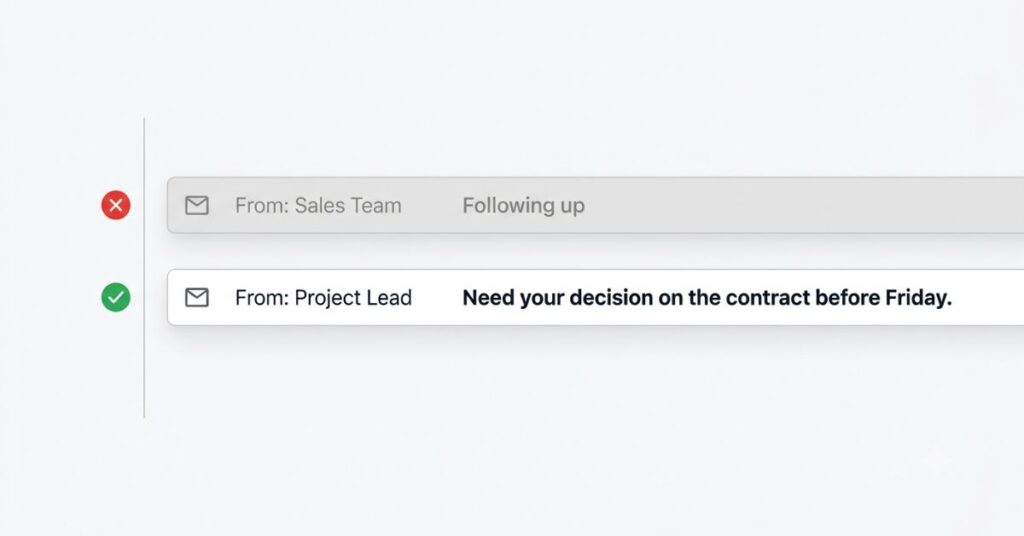
I should mention this because the prompt focuses entirely on the email body and ignores the subject line, which is doing more work than it gets credit for. A clear, direct email that nobody opens doesn’t help anything.
My subject lines used to read like “Quick question” or “Following up” or “Checking in.” All of these describe the email’s existence without saying what it’s about. Compare that to “Need a decision on the contract before Friday” or “Can we do Thursday 2pm instead?” Those get opened faster because the recipient already knows what they’re walking into. They’ve basically half answered before they’ve even clicked.
I run a quick check on subject lines using the same prompt now, just pasting in the subject line alone and asking whether it tells the recipient what’s actually in the email. More often than not the answer is no, and swapping “Quick question” for the actual question takes ten seconds.
Timing Is Real, Even Though It’s Not About the Writing
This is something I noticed after a while and wasn’t expecting. Two identical emails, different send times, different reply rates. Emails sent late Friday or over a weekend regularly sat unanswered through the following week, even when the exact same email sent on a Tuesday morning got a reply the same day.
I don’t think this means obsessing over the perfect send window. That’s its own rabbit hole and probably not worth the energy for most things. But for something genuinely time sensitive, sending it first thing Tuesday rather than late Friday is a free adjustment that costs nothing and adds up. The clearest, best structured email still has to land when someone’s actually paying attention.
There’s also something to be said for not sending a follow up immediately after your first email goes unanswered. I used to follow up after two days. What I’ve found is that three to five business days is usually enough time for someone to have seen the original and genuinely not had a chance yet, without being long enough that they’ve completely forgotten about it. Two days is often before they’ve even processed their inbox from when you sent the first one. It feels urgent to you because you sent it. To them it’s just one of forty emails that arrived on Wednesday.
Where This Goes Wrong in Practice
Using the output word for word without reading it as the recipient is one thing that trips people up. AI rewrites can go flat if you don’t push back on them, and flat is its own version of the original problem. I’ve had to send a second message more than once: “this still sounds like a template, make it sound like I actually know this person.” The first pass isn’t always right.
The other one I’ve done myself is confusing short with cold. Cutting throat clearing isn’t the same as cutting warmth, but it’s easy to overcorrect. One of my early rewrites came back reading like a transaction, completely technically correct, easy to reply to, and also just slightly off in a way I couldn’t place until I read it out loud and realised it sounded like nobody wrote it. I added one sentence of genuine context back in and it was fine. The goal is efficient, not stripped of any human texture, and those aren’t the same thing.
Cold outreach is also a different situation from following up with someone you’ve already spoken to. The prompt helps either way but the bar is higher when you’re emailing someone who’s never heard from you. The “why should this specific person care” part of the prompt needs actual research behind it when it’s a stranger, not just better phrasing of generic flattery. No prompt fixes an email to someone you haven’t actually looked into.
If what you’re sending is a document rather than a message like a proposal, a report or something dense rewriting it with AI first] often does more than fixing the email around it.
One more thing that caught me out early is running the prompt on an email and then editing the rewrite so heavily that you’ve basically put everything back that got cut. I’ve done this. You get the cleaner version, it feels too short, too blunt and you add back the explanation and the soft opening because it feels incomplete without them. Then you send it and it doesn’t get a reply and you blame the prompt. The editing instinct is understandable but if you find yourself adding three sentences back into a two sentence rewrite, it’s worth sitting with the discomfort of the short version for a bit before deciding it needs more.
Comparison Table
| Element | What Most Unanswered Emails Look Like | After the Prompt |
|---|---|---|
| Opening | Pleasantries, background, context | The actual ask in the first two sentences |
| Length | Long, covers everything “just in case” | Cut to what’s needed for a decision |
| Closing | Open ended (“let me know your thoughts”) | A specific question that only needs yes or no |
| Why they should care | Generic or assumed | Stated clearly, specific to that person |
| Tone | Reads like it could have gone to anyone | Reads like one person writing to another |
Tweaking It for Different Situations
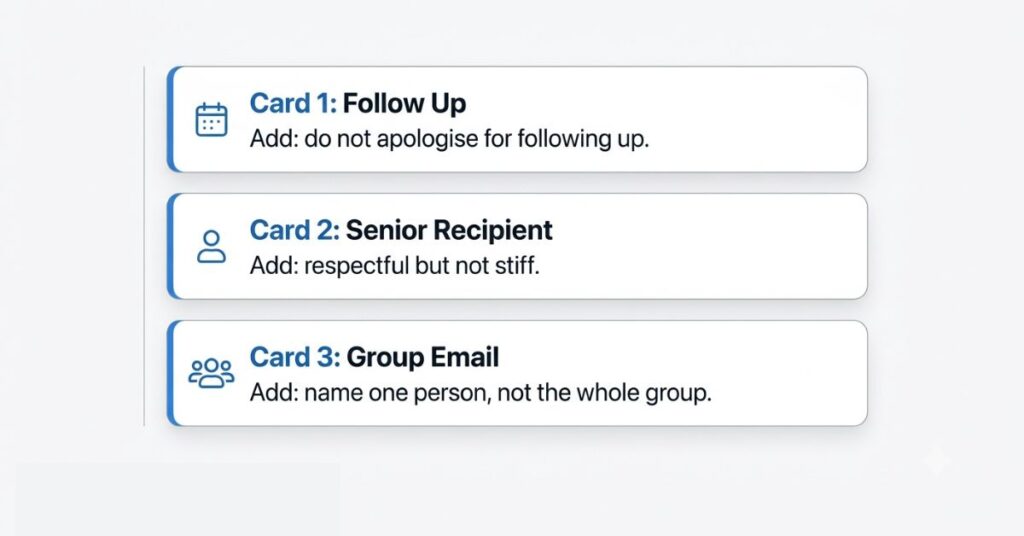
The default prompt works well but I’ve adjusted it slightly for different kinds of emails, and it’s worth knowing about rather than treating one version as a fixed thing.
For follow ups specifically, I add a line: “this is a follow up to something I sent on [date] with no response, do not apologize for following up, just restate the ask briefly and move on.” Without that instruction, it defaults to an apologetic tone the same way I used to, and that’s exactly what the original email didn’t need more of.
For anything going to someone more senior than me, a client or someone I’m trying to get time with for the first time, I add a note about keeping it respectful without going stiff or formal. Left on its own the rewrite sometimes goes too casual, which depending on the relationship reads as presumptuous rather than confident.
For group emails where I need one specific person to act but can’t send it only to them, I ask it to make sure the ask goes to someone by name somewhere in the body, not left open to the group. “Let me know your thoughts” sent to five people means four people assume someone else will reply.
When This Stops Being Theoretical
There’s a version of this where you read it, think it makes sense, and go back to writing emails exactly the way you were before. That’s what I did the first two or three times I came across advice like this before I actually started using a prompt.
The moment it stopped being abstract for me was a pitch I’d sent to someone who I really wanted a response from, not heard back after ten days, and was about to give up on. I rewrote it using the prompt, sent it as a second follow up, and got a reply within a day. The content of what I was asking hadn’t changed at all. The ask was just finally in the right place, phrased in a way that only needed a yes or a no, and didn’t bury itself under two paragraphs of explanation the person didn’t need.
That’s the version of this that becomes real. Not the abstract case, but the specific email you’re already sitting on, the one you’ve convinced yourself isn’t getting a reply because the other person is too busy.
How to Actually Start Using This
Run your next three outgoing emails through the prompt before sending, not just the important ones. The pattern you need to recognise isn’t visible from one email. It takes a few before you start seeing what you do consistently, the hedging phrases, the buried asks, the open ended closings, and by then you’ll start catching them before you even need the prompt.
Pay attention to what gets cut, not just what gets rewritten. If the same kind of sentence keeps disappearing, an apology, a sentence of unnecessary background, a soft opening that doesn’t say anything, that’s the habit worth fixing in how you write drafts in the first place, not just in how you edit them afterward.
And push back on the output if it doesn’t sound like you. Tell it what’s wrong specifically. The prompt is a starting point. It isn’t always right on the first pass.
FAQ
Final Thoughts
The emails that got ignored weren’t badly written. They were written for the wrong goal, designed to seem thorough and polite rather than designed to get a reply. Running a draft through this prompt once before sending takes maybe two minutes. The reason it helps isn’t that AI writes better than people do. It’s that it doesn’t care about the context you worked hard to include, the soft opening you thought was friendly, the hedge that felt like good manners. It cuts straight to whether the email does the thing an email is supposed to do. Usually it does that better than I managed on my own.
If you’re using email to follow up after a job interview or salary conversation, knowing what to say about salary expectations beforehand will save you even more of that silence.

Yes! Finally something about 1080.
Incredible! This blog looks just like my old one!
It’s on a entirely different subject but it
has pretty much the same layout and design. Excellent choice of colors!
Good information. Lucky me I discovered your site by chance (stumbleupon).
I’ve book marked it for later!
This is very interesting, You are a very skilled blogger.
I have joined your feed and look forward to seeking more of your
excellent post. Also, I have shared your web site in my social networks!
Simply want to say your article is as astounding.
The clearness for your post is simply excellent and that i can suppose you’re an expert in this subject.
Well together with your permission let me to snatch your RSS
feed to stay up to date with drawing close post. Thanks 1,000,
000 and please continue the enjoyable work.
Excellent site you have got here.. It’s difficult to find high quality writing like yours
these days. I really appreciate individuals like
you! Take care!!
Top picks for you https://sapreqot.com