
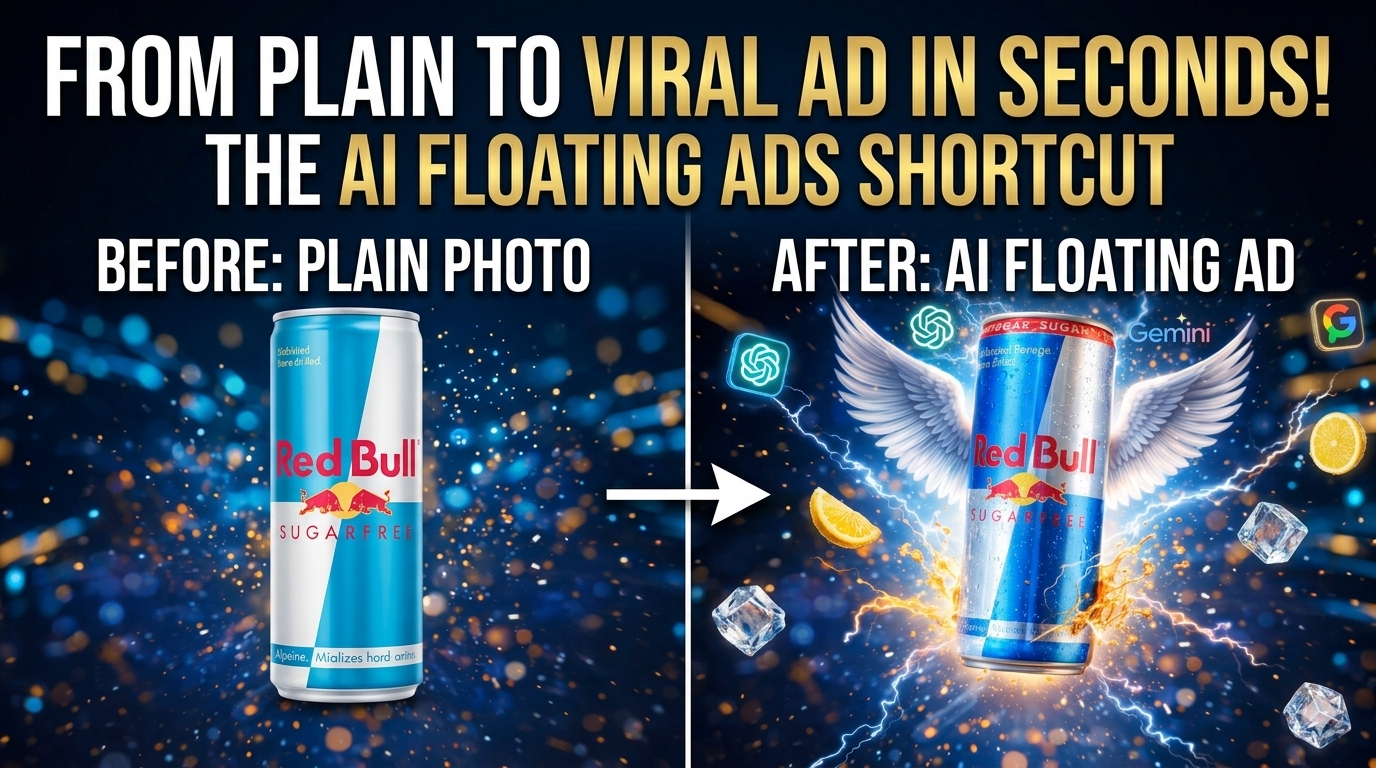
How to Turn a Simple Product Photo into a Viral Floating Product Ad Using AI
Creating eye-catching product ads used to require professional designers, expensive software, and hours of editing. But in 2025, AI tools have completely changed the game.
Now creators can transform a simple product photo into a cinematic floating advertisement in just a few minutes using AI image and video generation tools.
This technique is becoming popular among creators because it allows anyone to produce high-quality product ads for social media, e-commerce, and marketing without advanced design skills.
In this guide, you’ll learn the exact AI workflow used to convert a simple product photo into a viral floating ad video.
What Is a Floating Product Ad?
A floating product ad is a visual where a product appears to hover or rotate in a cinematic environment with lighting, particles, and motion effects.
These ads are commonly used for:
- Instagram Reels
- YouTube Shorts
- Online product marketing
- E-commerce promotions
The floating effect instantly makes the product look premium, modern, and engaging.
Tools You Need
You only need a few AI tools to create these ads.
AI Image Generator
Use tools like:
- ChatGPT
- Google Gemini
These tools can transform a simple product image into a stylized advertising visual.
AI Video Generator
To animate the product and create motion:
- Google Flow
This tool can convert images into short AI generated videos.
Step-by-Step: Create a Viral Floating Product Ad
Follow this simple workflow.
Step 1: Take a Photo of Your Product
Start by taking a clear product photo.
Examples:
- cosmetics
- gadgets
- food products
- clothing items
Make sure the product is well lit and clearly visible.
Step 2: Upload the Photo to ChatGPT or Gemini
Upload your product photo to an AI image generator like ChatGPT or Gemini.
Then ask the AI to transform it into a cinematic product advertisement style image.
Use this prompt:
Photo Prompt
Ultra-realistic floating 3D product advertisement of [PRODUCT NAME], add elements related to the product, vibrant lighting, cinematic background, professional advertising style, highly detailed, realistic shadows and reflections.
The AI will generate a more stylized advertising version of your product.
Step 3: Generate Multiple Ad Images
Once you have the first AI-generated image, you can create multiple variations.
For example:
1️⃣ Original product photo
2️⃣ AI styled product image
3️⃣ Second AI variation
4️⃣ Another cinematic variation
These multiple images will help create a smooth animation sequence.
Step 4: Convert Images into a Video
Next, upload the images into Google Flow and use the Image-to-Video feature.
Use this video prompt:
Video Prompt
Make the product rotate slowly in the air while transitioning between scenes. Add smooth cinematic lighting and floating motion like a premium advertisement.
The AI will generate a short animated product ad video.
Step 5: Combine and Edit
Finally, combine the generated clips in any simple video editor.
You can add:
- music
- text
- product name
- brand logo
The final result will look like a professional floating product advertisement.
Why This Method Is Going Viral
Many creators are using this AI workflow because it is:
✔ Beginner friendly
✔ Fast to create
✔ Perfect for short videos
✔ Ideal for social media marketing
Instead of hiring designers, creators can now produce high quality marketing content using AI tools.
Tips to Make Your AI Product Ads More Engaging
To make your ad look more professional:
- Use good lighting in the original photo
- Add related objects in the AI prompt
- Keep videos short (5–10 seconds)
- Use smooth transitions
These small improvements can make the ad look more cinematic and engaging.
Final Thoughts
AI tools are making it easier than ever to create professional marketing content. With just a product photo, you can generate a floating cinematic advertisement within minutes.
This workflow is especially useful for:
- small businesses
- content creators
- online sellers
- digital marketers
By combining AI image generation with AI video tools, anyone can create high quality product ads for social media and marketing campaigns.
Recommended For You
1- Viral AI Talking Objects
2- Tokyo Drift RX-7 AI Tutorial
3- Android System Cloner
4- ⭐️ THE 500K BLUEPRINT (Featured)
Want to grow like @techie.rimo? Steal the exact roadmap we used to hit 500,000+ followers & ₹3L/month.
Pingback: honeygain-review-earn-passive-income