
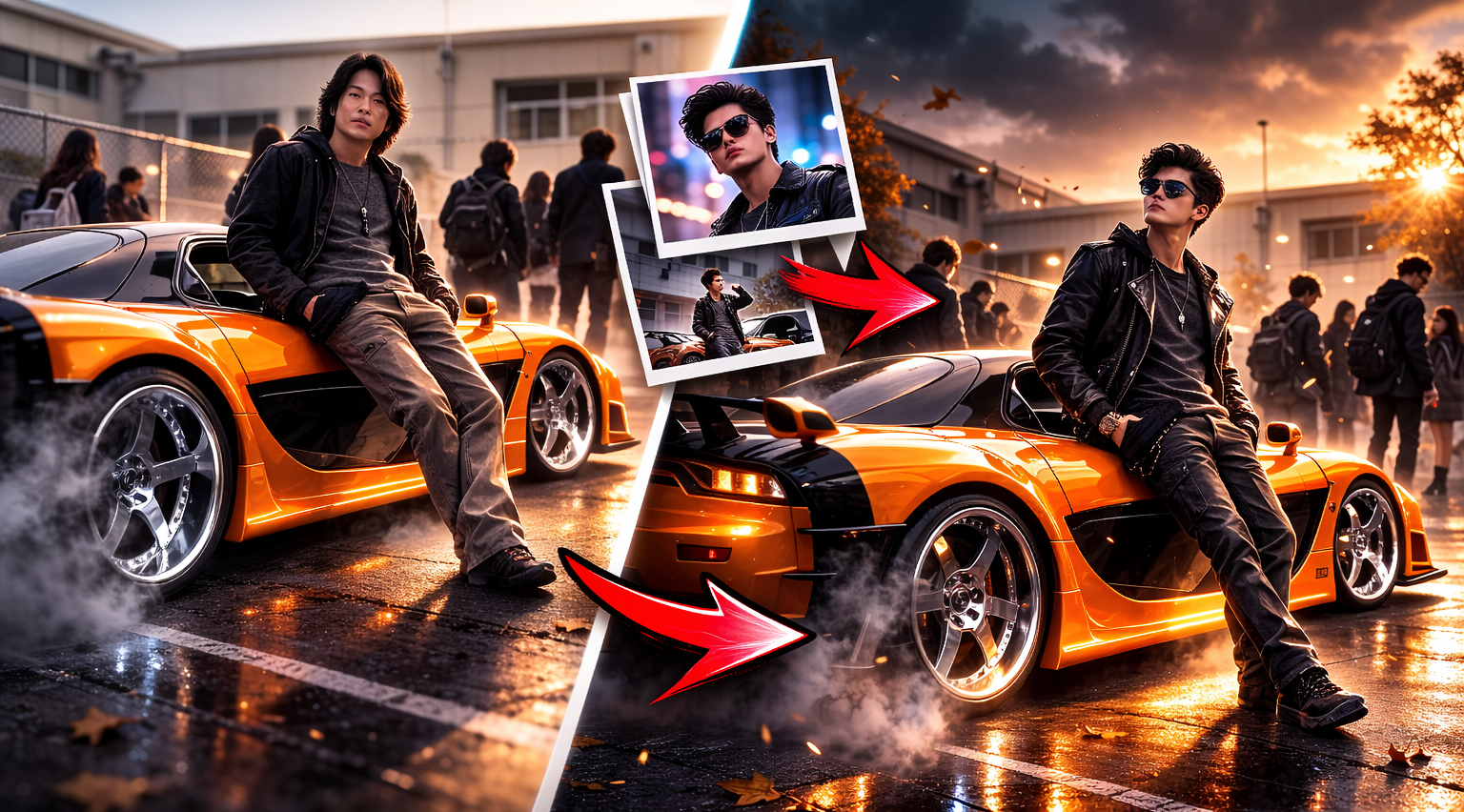
How to Recreate Han’s Tokyo Drift RX-7 Scene Using AI (Kling AI Prompt + Guide)
If you searched:
- “Han Tokyo Drift RX-7 scene”
- “Han pulling up at school Tokyo Drift”
- “Replace face in video with AI”
- “Kling AI character replacement tutorial”
- “Tokyo Drift Han AI edit”
- “Tokyo Drift AI prompt”
You’re in the right place.
Why This Scene Is Iconic
Han’s RX-7 pull-up scene in The Fast and the Furious: Tokyo Drift is one of the coldest entrances in the franchise.
The orange Mazda RX-7.
The smooth camera movement.
The confident, effortless energy.
The quiet dominance.
It’s not loud.
It’s not dramatic.
It’s aura.
If you’ve seen Tokyo Drift edits on TikTok or Instagram Reels, you already know — this scene dominates short-form content.
Now you can make it yours.
We’re about to recreate one of the coldest scenes in Fast & Furious history — but with you as the main character.
What Is Kling AI and How Does Character Replacement Work?
Kling AI is a video generation and editing AI model that allows you to modify or replace characters inside video clips.
Unlike basic face swap apps, Kling:
- Maintains original lighting
- Preserves camera movement
- Keeps body posture and motion natural
- Matches shadows and reflections
- Blends your face into cinematic footage
The “Kling 01” model supports character replacement in video clips.
Instead of rewriting the whole scene, it analyzes:
- Facial structure
- Head movement
- Lighting direction
- Scene depth
Then overlays your reference image onto the character.
That’s why it works especially well for scenes like Han’s RX-7 moment — the camera isn’t shaking wildly, and the lighting is controlled.
How to Replace Han With Yourself Using Kling AI
Step-by-Step Guide
This method uses Kling’s video character replacement model.
It’s simple.
No advanced editing.
No complex prompts.
You’ll do it in 2 clips and merge them together.
Step 1 — Download the Scene Clips
Click the button below to download the clip. A popup will appear — just tap “Download” to save it.
- The RX-7 pull-up shot
- The reaction / exit shot
- The RX-7 pull-up shot
- The reaction/exit shot
Step 2 — Open the Kling App
Download and open Kling AI.
Step 3 — Select “Kling 01”
Inside the app, choose:
Kling 01
This is the model that supports character replacement in videos.
Step 4 — Upload Video + Your Photo
Upload:
- The video clip
- A clear, front-facing image of yourself
Best results:
- Neutral facial expression
- Good lighting
- No sunglasses
- High resolution
Use This Exact Kling AI Prompt👇
“Replace the guy in video with image 1“
That’s it.
No cinematic keywords needed.
No overcomplicated instructions.
No “hyper realistic ultra 8k masterpiece” nonsense.
For character replacement, simplicity works better.
Step 5 — Generate the New Video
Kling will:
- Replace Han with your face
- Keep the RX-7
- Keep lighting and camera movement
- Maintain cinematic quality
Wait for generation to complete.
Download the output.
Step 6 — Repeat for the Second Clip
Upload the second scene.
Use the same prompt.
Generate again.
Consistency helps AI maintain facial structure across clips.
Step 7 — Merge Both Clips
Download both AI-generated clips.
Merge them using:
- CapCut
- VN Editor
- Premiere Pro
- Or any simple mobile editor
Now you have your custom Tokyo Drift edit — with yourself as the main character.
Troubleshooting: If the Face Looks Weird or Distorted
Sometimes AI character replacement isn’t perfect.
Here’s how to fix common issues:
1️⃣ Face Looks Blurry
- Use a higher resolution photo
- Avoid compressed images
- Crop tightly around your face
2️⃣ Skin Tone Doesn’t Match
- Use a photo with lighting similar to the scene
- Avoid harsh shadows in your reference image
3️⃣ Face Warping During Movement
- Use shorter clips
- Avoid scenes with extreme head turns
- Try generating twice and compare results
4️⃣ AI Changes the Car or Background
- Make sure your prompt only focuses on character replacement
- Avoid adding extra descriptive keywords
If one generation looks strange — regenerate.
AI outputs vary.
Can You Use This for Social Media?
Yes — this type of edit performs extremely well on:
- Instagram Reels
- TikTok edits
- YouTube Shorts
- Personal brand content
It taps into:
- Nostalgia
- Car culture
- AI trends
- Self-insertion edits
Which is why “Tokyo Drift Han AI edit” style videos are growing fast.
What You Just Created
You didn’t just swap a face.
You recreated one of the most iconic moments from Tokyo Drift — with yourself as the main character.
No yelling.
No overacting.
Just presence.
That’s elite AI content.
Prompt
Replace the guy in video with image 1
Video download kise kare
Scene 1 Download prr Click kroo.. Pop up aajayega download krne ke
lovelyy
Dawnload nhi ho raha h
Click On Download scene 1 & 2 & Make sure ur Pop-up is enabled
Pingback: How to Create a Viral Floating Product Ad Using AI (Step-by-Step Guide)